Opus vs Rkive AI (2026): Repurposing vs Autopilot

If you're comparing Opus Clips to alternatives, this is the clean, practical breakdown.
👉 Start 7-day free trial of Rkive
Prefer mobile? Rkive is also on the App Store and Google Play.
🔍 Quick Snapshot
Very short comparison, mostly yes/no.
| Feature | Opus Clips | Rkive AI |
|---|---|---|
| Long video → short clips | ✅ Core use case | ✅ Also supported |
| Camera-roll sync | ❌ No | ✅ Yes, continuous |
| Input multiple files | ⚠️ Mostly about one long file | ✅ Mix many videos & images |
| Repeatable style | ✅ Templates first | ✨ Strategy-driven styling |
| Prompts | ⚠️ Keyword search inside one transcript | ✅ Ask-anything like ChatGPT |
| Speed | ✅ 20–40 min | ✨ <5 min |
| Cloud storage | ✅ ~100 GB on Pro plans | ✅ Unlimited on all plans |
| Scheduling | ✅ Manually schedule videos | ✨ Analytics-aware auto-schedule |
| Posting | ✅ Yes, short videos | ✅ Yes, any finished post |
| Analytics | ❌ No built-in | ✅ Intelligent cross-platform |
| Best fit | 🎧 Long podcasts, webinars, courses | 📱 Daily creators, brands & teams |
🎧 Where Opus Clips Shines
Opus Clips is a good fit when your content looks like this:
- You record long podcasts, webinars, or YouTube videos.
- Those videos are already edited (cuts, basic audio, main structure done).
- You want dozens of short clips you can share across social.
Typical Opus Clips workflow:
- Export your long, finished video.
- Upload it to Opus Clips.
- Opus finds potential highlight moments.
- You refine them in a timeline with transcript, deleting words/segments and adjusting clips.
- You export the clips, and on supported plans you can auto-post to platforms like YouTube, Instagram Reels, TikTok, Facebook Pages, LinkedIn Business and X.
Opus Clips is genuinely strong for:
- Turning a single long asset into many social-ready short videos.
- Template-led editing with stock B-roll and overlays.
- Highlight extraction driven by transcript + keyword-style inputs inside that long video.
Just keep in mind what it’s not really aimed at:
- Mixing many short videos and images into one structured post.
- Designing carousels, infographics, or pure text posts.
- Acting as a full content OS with calendar, deep analytics and a shared workspace.
It’s a focused tool: long edited video → multiple short clips.
📱 What Rkive Is Designed For
Rkive exists for camera-roll-first creators, founders and brands who want the whole pipeline to feel like magic:
- You shoot short clips, POVs, product shots, screen recordings, selfies, B-roll.
- Most of your content lives inside your phone and camera roll, not as one giant edited episode.
- You want AI to handle the entire edit by default, and you only step in to tweak.
Rkive behaves less like a single tool and more like a content OS: the place where your footage, edits, schedule and analytics live together.
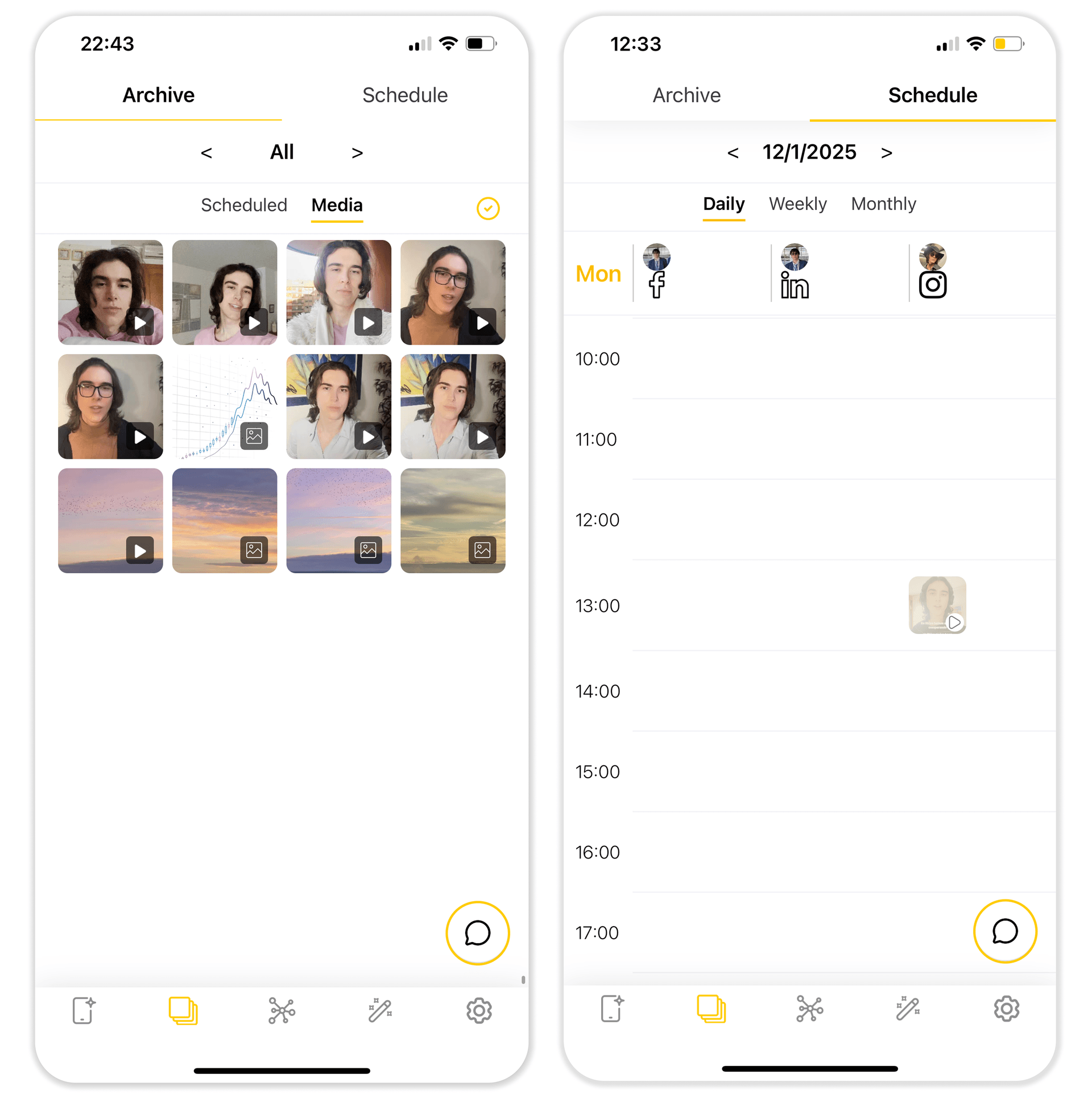
📂 Camera-roll first + unlimited cloud
- Rkive syncs your camera roll (with your permission).
- It keeps your media and posts in unlimited cloud storage, more like a content brain than a one-off project folder.
- You don’t have to think about exporting/importing files — your library just stays in sync across devices.
🧠 Prompt-driven, intelligent editing (beyond clipping)
In Opus, keyword-style inputs help you find segments inside one long video.
In Rkive, prompts define the whole post:
- “Make a 35s fast-paced short video with big subtitles and a meme cutaway when I mention numbers.”
- “Create a 5-panel carousel summarising these clips with bold headers and clean layouts.”
- “Turn today’s talking clips into a LinkedIn-style text post with one supporting frame.”
Rkive’s multi-agent system decides:
- which clips to use,
- how to cut and sequence them,
- where to place subtitles,
- which overlays and assets to bring in,
- what the final format should look like.
You’re describing outcomes, not micro-managing cuts from scratch.
🎛️ Multiple files → any finished post
Rkive is built around multi-file editing:
- Combine several raw clips, screenshots, photos, and product shots.
- Output:
- short videos for Reels/Shorts/TikTok,
- carousels,
- infographics,
- text-style posts for LinkedIn, Threads or X.
It’s optimised for daily, mixed content, not just one big flagship video.
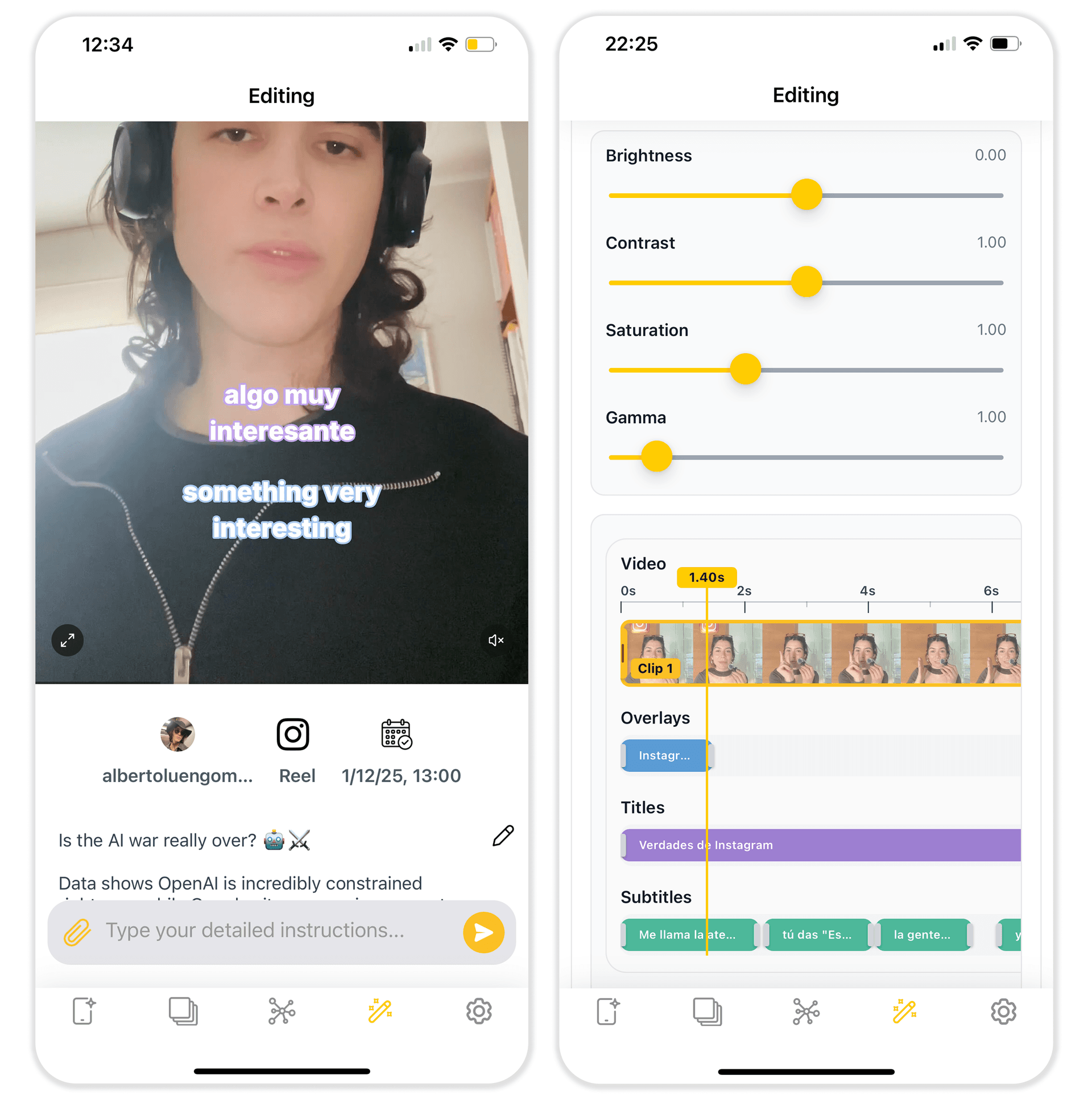
✏️ Manual control when you want it
Rkive isn’t a black box. When you want more control, you can:
- adjust timing and cutting in a timeline view,
- tweak subtitle text and styling,
- move/resize overlays, stickers, logos,
- refine layout, framing and pacing.
You get editor-level control on top of intelligent automation, instead of having to choose one or the other.
📅 Scheduling & posting built-in
Rkive doesn’t stop at exporting:
- See a feed of your own posts (like your own social feed, but editable).
- Double-tap to schedule a post directly from the feed.
- Open any post in the editor if you want to tweak it before or after scheduling.
- In the content calendar you can reschedule, duplicate or adapt posts for different social accounts.
📊 Analytics that look at everything
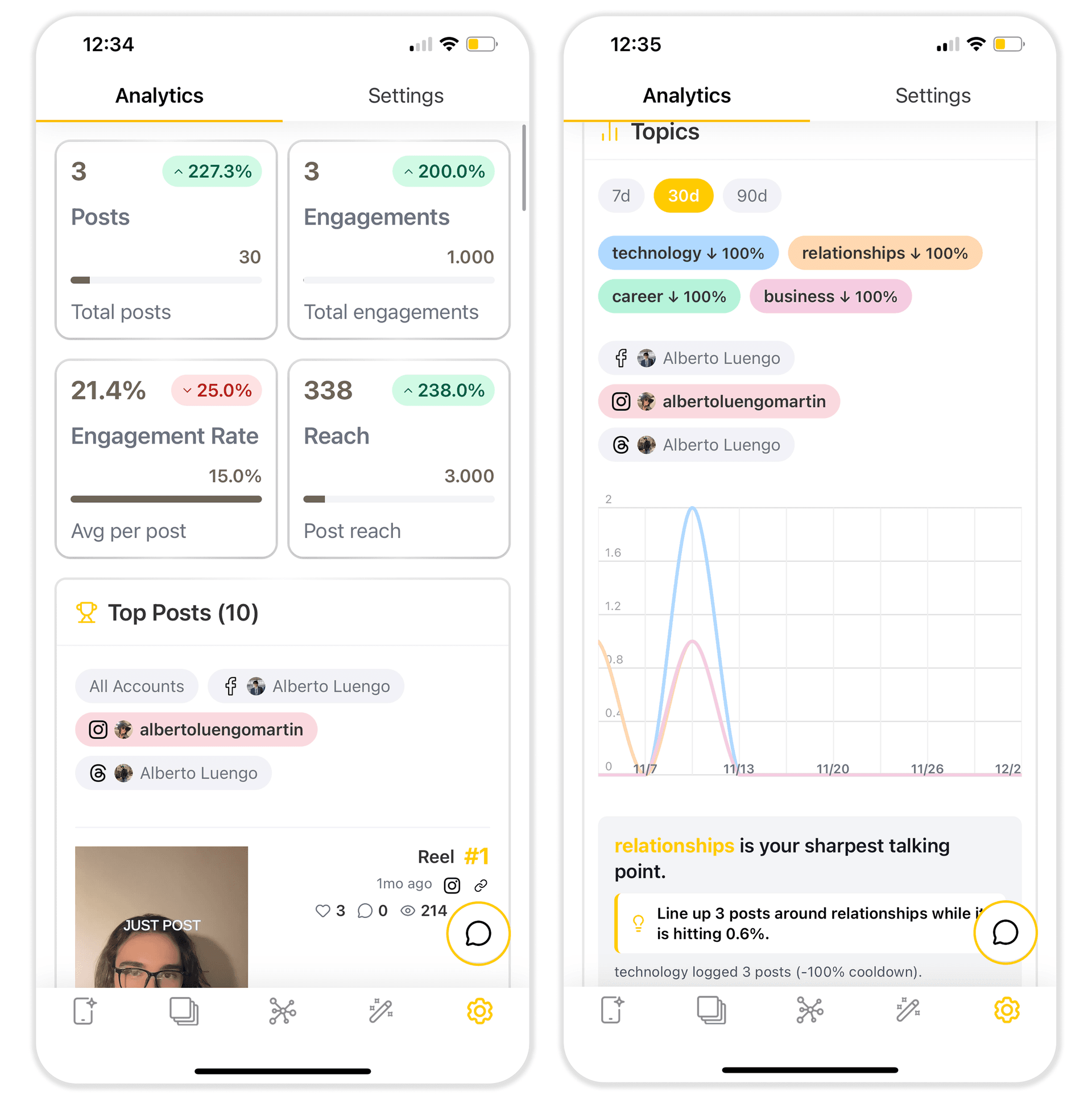
- Rkive ingests performance across your connected accounts.
- It includes posts you didn’t create with Rkive.
- AI layers on top to highlight what’s working: hook patterns, lengths, formats, posting times.
You’re not guessing from separate dashboards; you see your ecosystem in one place, inside your content OS.
💻 Works on all your devices
- Web app in the browser.
- iPhone, iPad, Android phones and tablets.
- macOS and Apple Vision Pro.
Wherever you film or review, your workspace stays synced.
📊 High-Level Feature Comparison
More detailed view for when you want to read the fine print.
| Feature / Aspect | Opus Clips | Rkive AI |
|---|---|---|
| Primary use case | 🎧 Long edited video → short clips | 📱 Daily camera-roll → finished posts |
| AI editing | 🎞️ Templates + script editing | 🧠 GPT-like prompts + autopilot |
| Speed | ⏳ 20–40 m clipping + edit & export time | ⚡ <5 m fully edited & exported |
| Manual editing | ✂️ Conventional CapCut-like | 🎚️ Minimalist Figma-like |
| Input | 📥 One long file for auto-clipping | 📂 Many clips and images for each post |
| Short videos | 🎬 Main focus | 🎬 Native, plus other formats |
| Carousels & infographics | 🟥 Not available | 🟩 Intelligent, any style |
| Text posts | 🟥 Not available | 🟩 Intelligent, any style |
| Templates | 🎭 Strong presets & stock B-roll | 🧩 AI-chosen clips, gifs, stickers, web images... |
| Cloud storage | ☁️ ~100 GB on Pro for projects | ☁️ Unlimited on all plans for media and posts |
| Uploads | 📥 Manually upload files | 📸 Camera-roll sync across devices, like iCloud |
| Scheduling | 🕒 Manually schedule videos | ✨ Analytics-aware auto-schedule by double tapping |
| Posting | 📤 Auto-post short videos | 📤 Auto-post any format |
| Analytics | 🧮 Not available | 📊 AI & cross-platform, including non-Rkive posts |
| Team & organisation | 👥 Project sharing | 🏢 Shared media, calendar, analytics... with team roles |
| UI languages | 🌐 Mainly English | 🌐 10 (EN, ES, FR, DE, PT, AR, JA, KO, VI, ZH) |
| AI languages | 🗣️ 20 languages | 🗣️ 40+ languages |
| Device coverage | 💻 Web, 📱 iOS, 💻 macOS | 💻 Web, 📱 Android, 📱 iOS, 💻 macOS, 🥽 Vision Pro |
| Best suited for | 🎧 Podcasters, webinar hosts, educators | 📱 Daily creators, founders, brands & agencies |
⏱️ A Day with Each Tool
A day with Opus Clips
- Record and edit a 45-minute podcast, webinar or YouTube episode.
- Export the final video.
- Upload it to Opus Clips.
- Let it detect highlight moments.
- Use the transcript timeline and templates to refine the clips.
- Export or auto-post those clips to supported platforms.
This is ideal if your content engine is built around long, polished episodes and your main need is slicing them into short videos.
A day with Rkive
- Film throughout the day: quick talking clips, product shots, screen recordings, behind-the-scenes, B-roll.
- Rkive syncs your camera roll in the background.
- Its agents build:
- short videos,
- carousels,
- infographics,
- text-first posts.
- You open Rkive and see a feed of ready-to-publish posts.
- Double-tap to schedule them, or open the editor to tweak details.
- In the calendar, you can reschedule, duplicate or adapt posts for other social accounts.
This is the setup when you want continuous output without constant editing sessions.
🚀 When Opus Is Enough vs When Rkive Is the Upgrade
Use Opus Clips if:
- Your main asset is long, edited video (podcasts, webinars, long YouTube episodes).
- You’re happy with template-based short clips.
- You don’t need carousels, infographics, or text posts in the same tool.
- You’re fine keeping scheduling and analytics in other platforms.
Use Rkive AI if:
- Most of your content starts in your camera roll, not your video editor.
- You want intelligent, prompt-driven editing across many raw clips and images.
- You prefer to tweak strong drafts rather than build every edit from zero.
- You want editing, storage, scheduling, auto-posting and analytics in one workspace.
- You’re publishing daily across several platforms and want a content OS, not just a slicer.
👉 Start your 7-day free trial of Rkive
Web, iOS, Android · unlimited cloud storage · cancel anytime during trial
If you’re happy slicing long episodes into short videos, Opus Clips will do its job.
If you’re ready for your camera roll to basically edit, schedule and post itself — with real control when you want it — Rkive is the upgrade.