Filmora vs Rkive AI (2026): Timeline vs Agents

If you're comparing Filmora to alternatives, this is the clean, practical breakdown.
👉 Start 7-day free trial of Rkive
Prefer mobile? Rkive is also on the App Store and Google Play.
🔍 Quick Snapshot
Very short comparison, mostly yes/no.
| Feature | Filmora | Rkive AI |
|---|---|---|
| Long video → short edits | ✅ Yes | ✅ Yes |
| Camera-roll sync | ❌ No | ✅ Yes |
| Multi-file input | ✅ Yes (projects) | ✅ Yes (posts) |
| Repeatable style | ✅ Templates | ✨ Strategy-driven |
| Prompts | ⚠️ Script search | ✅ GPT-like prompts |
| Speed | ⏳ 20–60 min | ⚡ <5 min |
| Cloud storage | ⚠️ Limited | ✅ Unlimited |
| Scheduling | ❌ No | ✨ Built-in |
| Posting | ❌ Manual export | ✅ Auto-post |
| Analytics | ❌ No | ✅ Cross-platform |
| Best fit | 🎬 Editors | 📱 Daily creators & brands |
🎬 Where Filmora Shines
Filmora is strong when you want:
- Hands-on timeline control for full videos.
- Effects, titles, motion graphics and keyframe-based styling.
- A classic desktop editing session workflow.
Typical Filmora workflow:
- Import footage into a project.
- Build a timeline with cuts, transitions and effects.
- Add titles, filters and overlays.
- Use AI helpers (auto captions, smart cutout, reframing, audio cleanup).
- Export the final video and upload manually.
Filmora is ideal for:
- YouTube videos, tutorials, promos.
- Creators who want full manual control.
- Editing one polished video at a time.
Where it’s not meant to compete:
- Turning raw camera-roll chaos into fast finished posts.
- Creating carousels, infographics or text posts.
- Running your whole pipeline (storage → schedule → analytics).
Filmora is a production tool: timeline → exported video.
📱 What Rkive Is Designed For
Rkive exists for camera-roll-first creators who want automation by default:
- You film throughout the day.
- Your content lives in your camera roll, not in one big project.
- You want posts generated automatically — not built clip by clip.
Rkive behaves like a content OS, not an editor.
📂 Camera roll → unlimited cloud
- Continuous camera-roll sync.
- Unlimited cloud storage.
- Your media stays synced across all devices.
🧠 Prompt-driven, post-level editing
Prompts shape the final post, not the timeline:
- “Make a 30s short with big subtitles and fast pacing.”
- “Create a carousel for a weekly recap.”
- “Turn today’s work event pics into a LinkedIn post with long text that will get comments.”
Agents decide:
- which clips to use,
- cut + pacing,
- subtitles + overlays,
- layout for each format.
🎛️ Many clips → any finished post
Mix real footage:
- talking clips,
- B-roll,
- screenshots,
- photos.
Output:
- short videos,
- carousels,
- infographics,
- text-style posts.
✏️ Manual control when needed
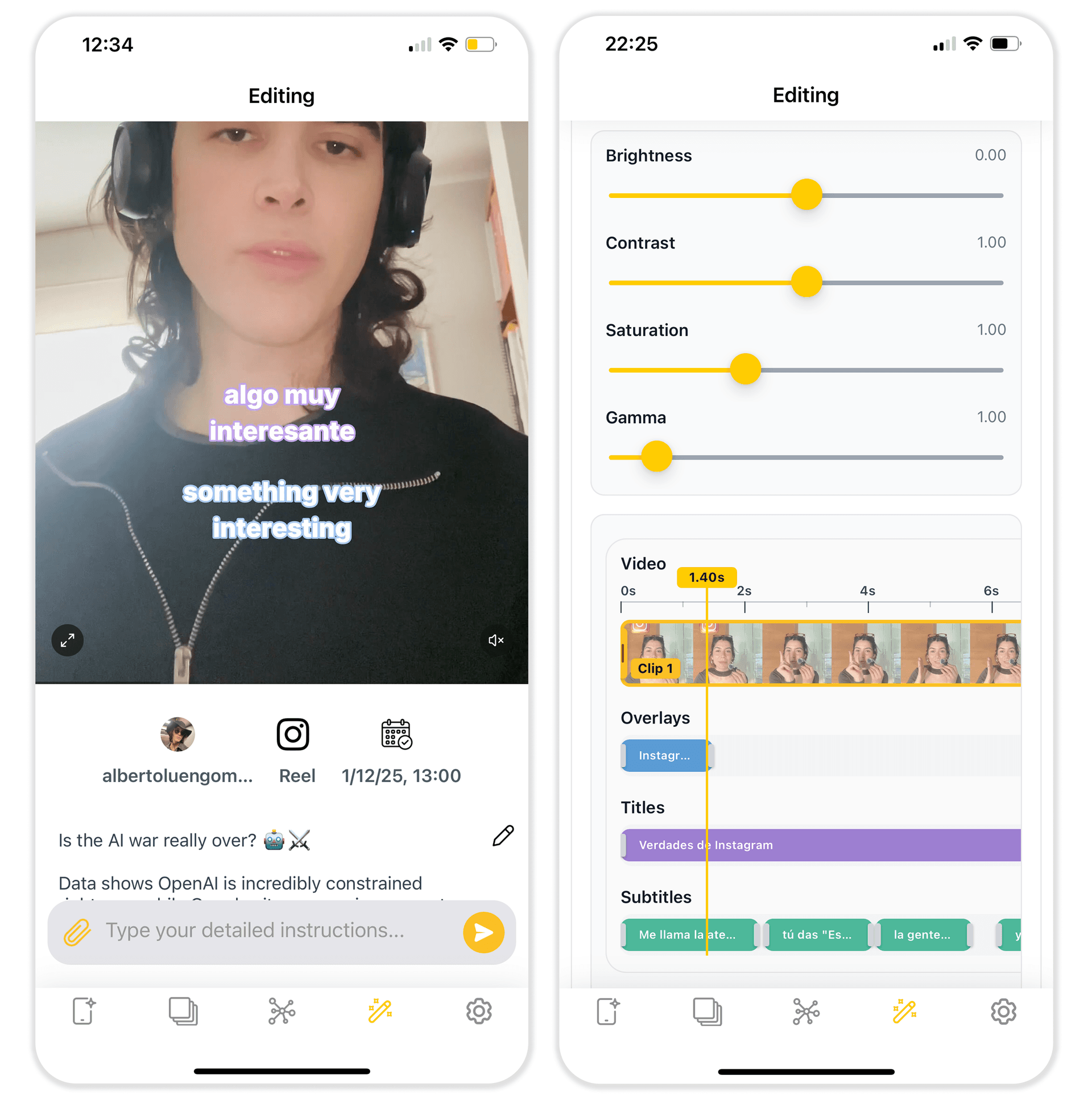
Open a simple timeline to:
- tweak cuts,
- edit subtitles,
- move overlays,
- adjust pacing.
📅 Scheduling & posting built in
- Editable feed of your posts.
- Double-tap to schedule.
- Adapt per platform.
- Unified content calendar.
📊 Analytics included
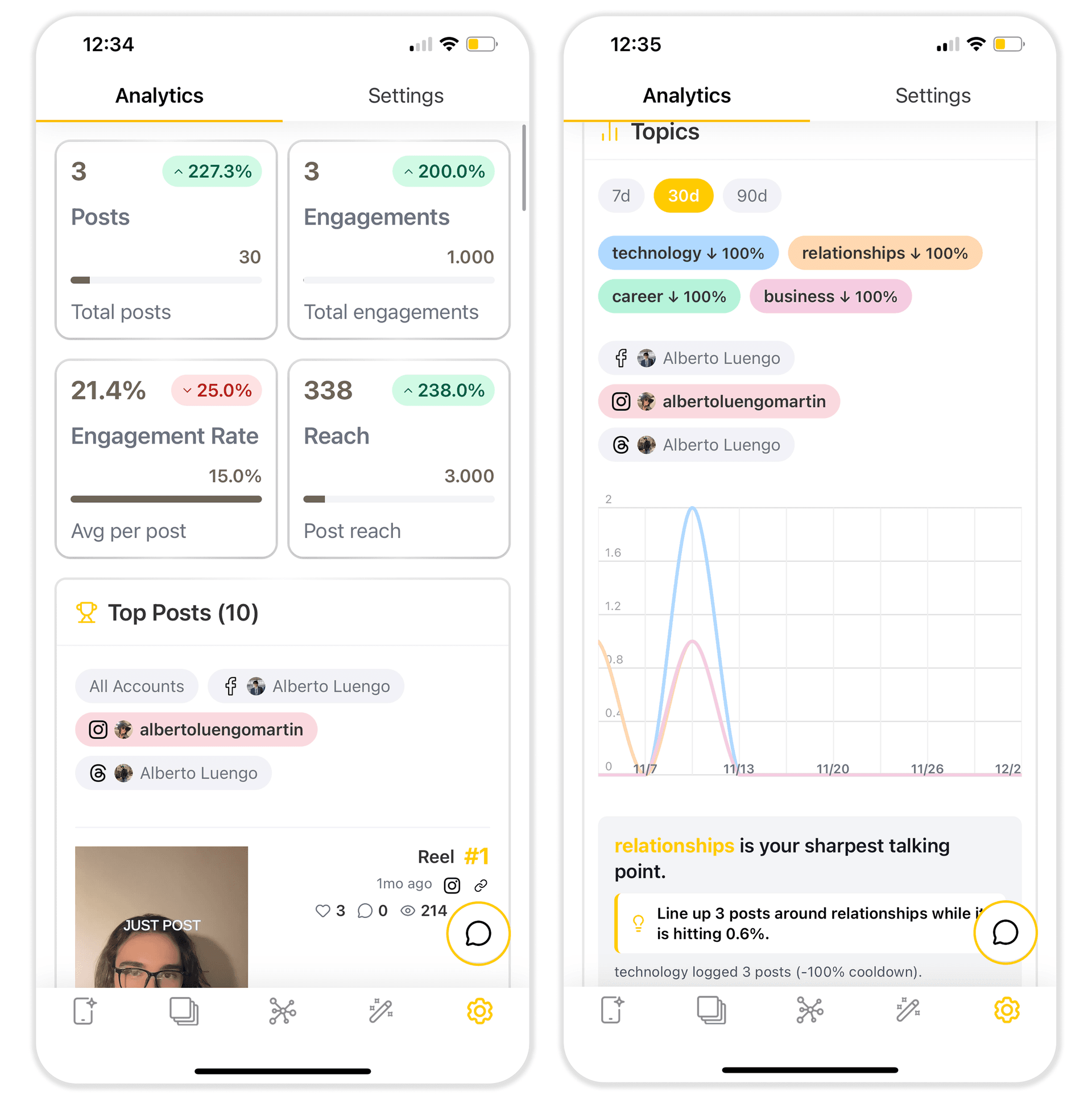
- Cross-platform performance.
- Covers posts made inside and outside Rkive.
- AI surfaces patterns: hooks, lengths, formats, timing.
💻 Runs everywhere
Web, Android, iOS, macOS, Vision Pro.
📊 High-Level Feature Comparison
Detailed comparison for when you want specifics.
| Feature / Aspect | Filmora | Rkive AI |
|---|---|---|
| Primary use case | 🎬 Long/medium videos → polished edits | 📱 Daily camera-roll → finished posts |
| Editing model | 🎞️ Timeline + effects | 🧠 Agents + prompts + light timeline |
| Short videos | 🎬 Strong manual | 🎬 Native + automated |
| Carousels / infographics | 🟥 Not supported | 🟩 Yes |
| Text posts | 🟥 Not supported | 🟩 Yes |
| Templates | 🎭 Many presets | 🧩 AI-chosen assets (clips, GIFs, stickers, images) |
| AI helpers | 🤖 Captions, cutout, audio tools | 🤖 Multi-agent autopilot |
| Cloud storage | ⚠️ Limited project backup | ☁️ Unlimited |
| Uploads | 📥 Manual | 📸 Camera-roll sync |
| Scheduling | 🟥 None | 📅 Built-in calendar + feed |
| Auto-posting | 🟥 None | 📤 Auto-post any format |
| Analytics | 🟥 None | 📊 Cross-platform + AI insights |
| Team & organisation | 👥 Project sharing | 🏢 Shared media, calendar, analytics, roles |
| Device coverage | 💻 Desktop + mobile | 🌐 Web, 📱 Mobile, 💻 macOS, 🥽 Vision Pro |
| Best suited for | 🎬 Editors, YouTubers | 📱 Daily creators, founders, brands & agencies |
⏱️ A Day with Each Tool
A day with Filmora
- Import clips and build a timeline.
- Add transitions, titles and effects.
- Apply AI helpers.
- Export and post manually.
Perfect when you want full manual control and work in editing sessions.
A day with Rkive
- Film throughout the day.
- Rkive syncs your camera roll.
- Agents generate:
- short videos,
- carousels,
- infographics,
- text posts.
- Double-tap to schedule.
- Calendar manages all platforms.
Perfect when you want continuous, multi-format output without editing sessions.
🚀 When Filmora Is Enough vs When Rkive Is the Upgrade
Use Filmora if:
- you want extreme customization,
- you don't mind editing for hours,
- you make YouTube videos, tutorials, promos,
- you’re happy exporting and posting manually.
Use Rkive AI if:
- your content starts in your camera roll,
- you want prompt-driven posts, not long projects,
- you want storage, scheduling, posting and analytics in one workspace,
- you’re publishing daily across multiple platforms.
👉 Start your 7-day free trial of Rkive
If you love timeline editing, Filmora will do its job.
If you want your camera roll to basically edit, schedule and post itself — with control when you want it — Rkive is the upgrade.