CapCut vs Rkive AI (2026): Templates vs Prompts

If you're comparing CapCut to alternatives or deciding where your 2026 content workflow should live, this is the clean, practical breakdown.
👉 Start 7-day free trial of Rkive
Prefer mobile? Rkive is also on the App Store and Google Play.
🔍 Quick Snapshot
Very short comparison, mostly yes/no.
| Feature | CapCut | Rkive AI |
|---|---|---|
| Long video → short clips | ✅ Main use case | ✅ Also supported |
| Camera-roll sync | ❌ No | ✅ Yes, continuous |
| Multiple files | ✅ Many clips | ✅ Many clips & images |
| Style system | ✅ Templates, filters, effects | ✨ Prompts + autopilot |
| Prompts | ✅ Mainly for video generation | ✅ GPT-like prompts for editing |
| Speed | ✅ ~10–30 min | ✨ <5 min |
| Cloud storage | ⚠️ Paid space (no free tier) | ✅ Unlimited on all plans |
| Scheduling | ❌ No | ✨ Calendar & auto-schedule |
| Posting | ✅ Export/share to social apps | ✅ Auto-post any finished post |
| Analytics | ❌ No | ✅ Intelligent & cross-platform |
| Best fit | 🎬 Editors & TikTok creators | 📱 Daily creators, brands & teams |
🎬 Where CapCut Shines
CapCut is a strong choice when your workflow looks like this:
- You post a lot of short-form video: TikToks, Reels, Shorts.
- You like working in a timeline editor with layers, effects and precise control.
- You want ready-made templates that give you trending styles quickly.
Typical CapCut workflow:
- Import media: add clips, photos or built-in stock assets on web, desktop or mobile.
- Pick a template or start from scratch: choose from viral-style templates or build your own timeline.
- Edit on the timeline: cut, trim, change speed, add transitions, filters, text and stickers.
- Use AI helpers: auto captions, text-to-speech, script-to-video, AI backgrounds, AI audio cleanup and more.
- Export or share: export at social-friendly resolutions, then publish to TikTok, Instagram or YouTube through each platform's share flow.
CapCut genuinely shines for:
- Template-first editing when you want something that looks good fast.
- Repurposing longer videos into shorts with effects and captions.
- Desktop and mobile editing with similar tools across devices.
- Teams that want a familiar NLE-style editor but with AI add-ons.
Where it is not designed to be the full answer:
- Turning daily camera-roll chaos into ready posts without timelines.
- Creating carousels, infographics or text-only posts.
- Running your calendar, auto-posting and analytics from one place.
CapCut is a modern editor: clips + templates → stylised videos.
📱 What Rkive Is Designed For
Rkive exists for camera-roll-first creators, founders and brands who want the whole pipeline to feel automatic by default:
- You record throughout the day on your phone: talking clips, B-roll, product shots, screen grabs.
- Your raw material lives in your camera roll, not neatly organised projects.
- You want AI to handle the whole edit by default, and you just tweak the result.
Rkive behaves less like a single tool and more like a content OS: the place where your footage, edits, schedule and analytics live together.
📂 Camera-roll first + unlimited cloud
- Rkive syncs your camera roll (with your permission) on iOS and Android.
- All media and posts go into unlimited cloud storage, behaving more like a searchable content brain than individual project files.
- Your library stays in sync across web, mobile and desktop; you do not think about transfers or exports.
🧠 Prompt-driven, intelligent editing (beyond templates)
With CapCut, AI helps you inside a project: templates, auto captions, text-to-video, effects.
With Rkive, prompts define the final post across many raw pieces:
- Make a 30s short with big subtitles and a quick meme cutaway when I mention price.
- Build a 5-slide carousel summarising these clips with bold titles and simple charts.
- Turn today's talking clips into a LinkedIn-style text post plus one supporting frame.
Rkive's multi-agent system decides:
- which clips and images to pull in,
- how to cut, sequence and pace them,
- where to place subtitles and overlays,
- what layouts and typography to use for the chosen format.
You describe the outcome; Rkive proposes a finished draft.
🎛️ Many files → any finished post
Rkive is built to think in posts, not traditional projects:
- Mix:
- selfie talking clips,
- product B-roll,
- screen recordings,
- photos and screenshots.
- Output:
- short vertical videos for Reels, Shorts and TikTok,
- carousels and infographics,
- text-first posts for LinkedIn, Threads or X.
It is tuned for daily multi-format output, not just video sequences.
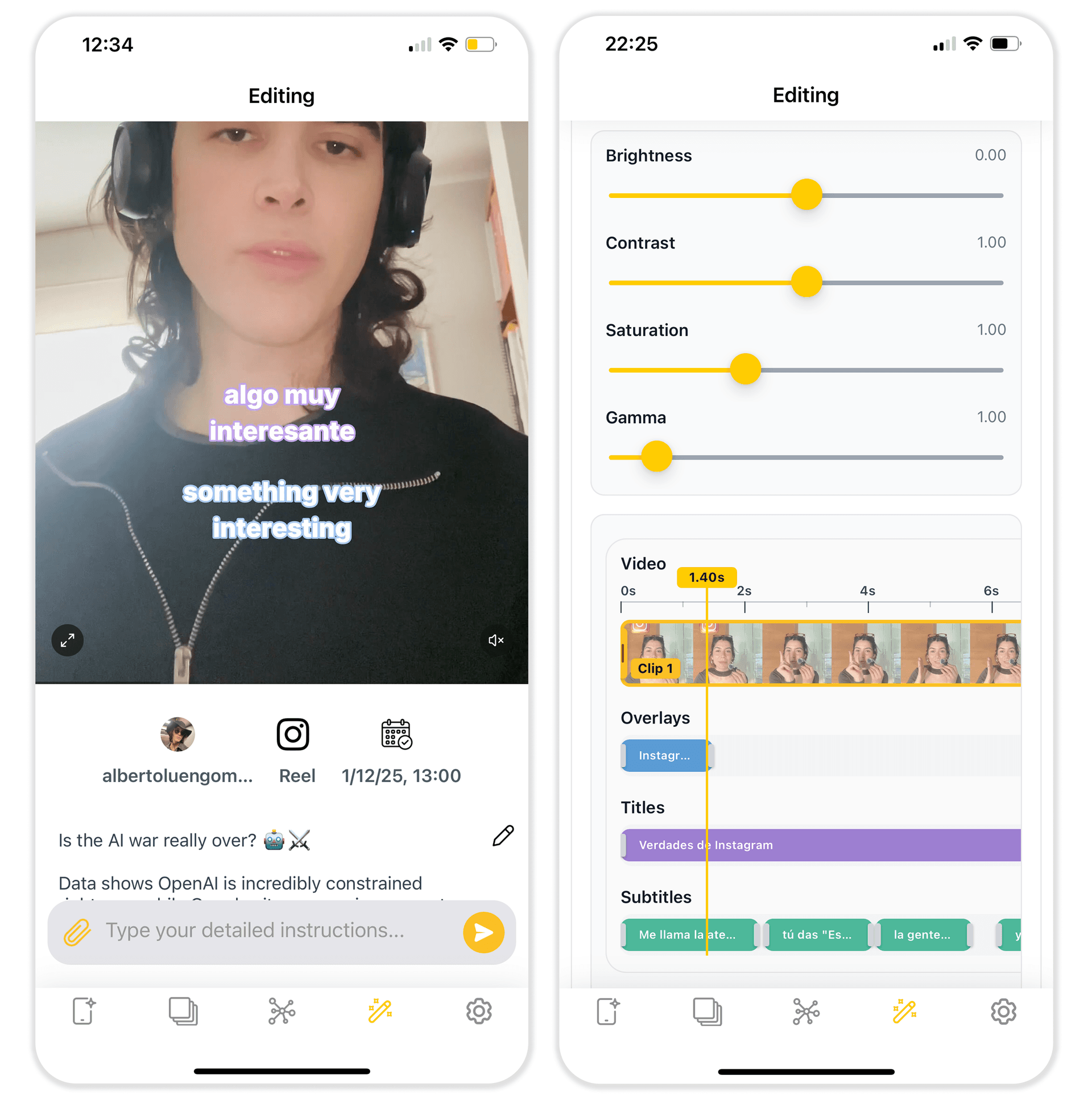
✏️ Manual control when you want it
The default is autopilot, but Rkive does not lock you out:
- Open any draft in a simple timeline to tweak cuts and timing.
- Edit subtitle text, fonts and layout.
- Move or resize overlays, stickers, product shots and logos.
- Fine-tune framing, zooms and pacing when you care about the details.
You get editor-level control on top of automation, instead of choosing between magic button or full manual.
📅 Scheduling & posting built-in
Rkive does not end at export:
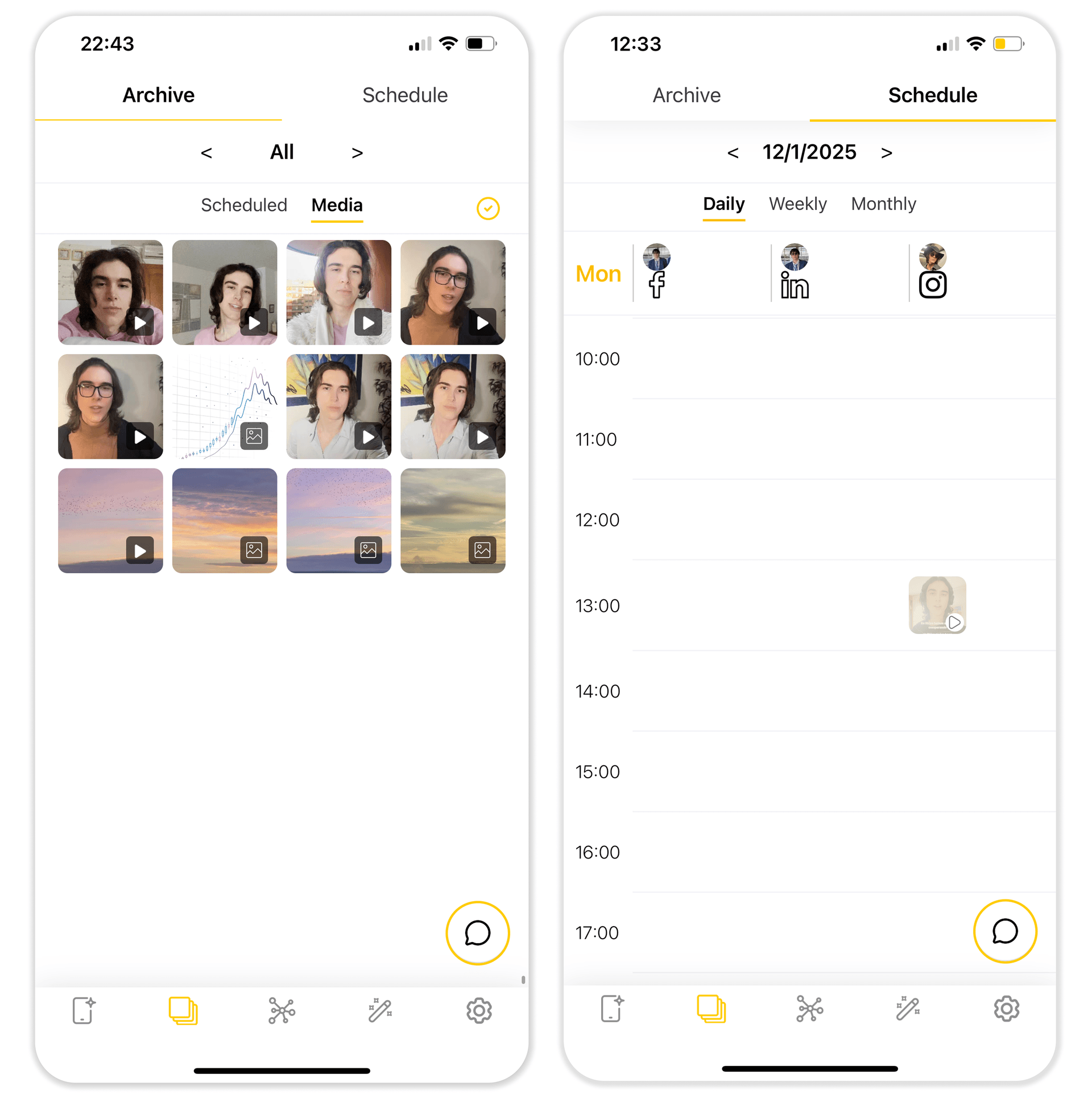
- You see a feed of your own Rkive-made posts — like your social feed, but everything is editable.
- Double-tap to schedule directly from the feed.
- Open a post to adjust copy, visuals or timing without rebuilding it.
- Use the content calendar to move slots, duplicate posts or adapt them per social account.
📊 Analytics that look at everything
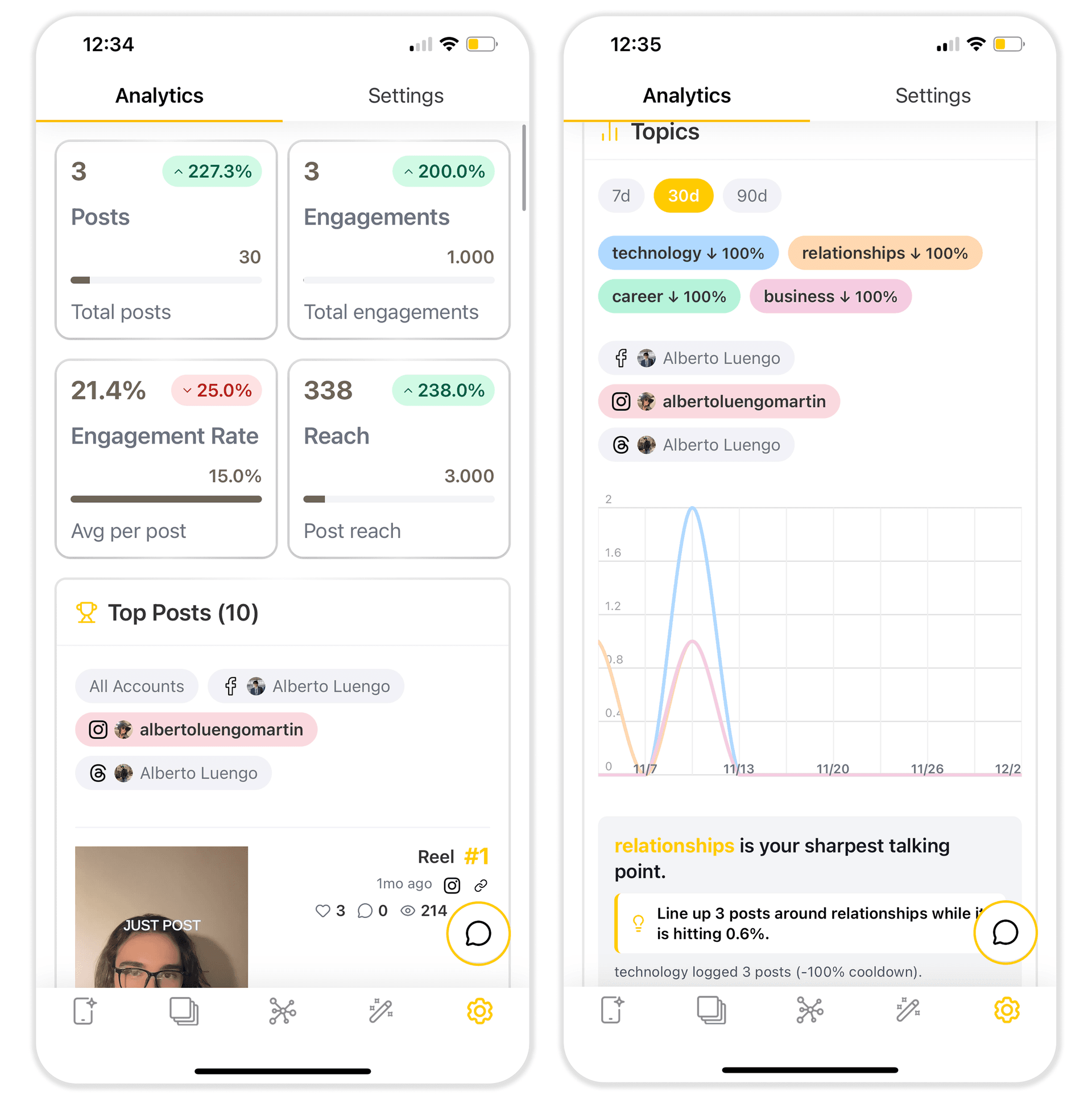
- Rkive ingests performance across your connected social accounts.
- It tracks posts created inside and outside Rkive.
- AI highlights patterns: hook types that work, best lengths, formats, posting times and per-platform behaviour.
You are not juggling dashboards; you see one cross-platform view inside the same workspace that creates the content.
💻 Works on all your devices
- Web app in the browser.
- iPhone, iPad, Android phones and tablets.
- macOS and Apple Vision Pro.
Wherever you film or review, your workspace stays synced.
📊 High-Level Feature Comparison
More detailed view for when you want to read the fine print.
| Feature / Aspect | CapCut | Rkive AI |
|---|---|---|
| Primary use case | 🎬 Short-form video edits | 📱 Daily camera-roll → finished posts |
| Editing model | 🎞️ Timeline + templates | 🧠 Prompts + timeline + autopilot |
| Learning curve | 🧰 Classic editor UX | 🧭 Feed and prompts, light editor |
| Short videos | 🎬 Core focus | 🎬 Native, plus other formats |
| Carousels & infographics | 🟥 No | 🟩 Yes |
| Text-only posts | 🟥 No | 🟩 Yes |
| Templates | 🎭 Many templates and effects | 🧩 AI-chosen clips, gifs, stickers |
| AI helpers | 🤖 Video generation & effects | 🤖 Multi-agent editing across formats |
| Cloud storage | ☁️ Paid cloud space, no free tier | ☁️ Unlimited media and posts on all plans |
| Uploads | 📥 Manual | 📸 Camera-roll sync |
| Scheduling | 🟥 No | ✨ Calendar and auto-schedule by double tapping |
| Posting | 📤 Export or share to social apps | 📤 Auto-post any format across major platforms |
| Analytics | 🟥 No | 📊 AI and cross-platform, including non-Rkive posts |
| Team & organisation | 👥 Cloud projects, basic collaboration | 🏢 Shared media, calendar, approvals and roles |
| UI languages | 🌐 25 languages | 🌐 10 (EN, ES, FR, DE, PT, AR, JA, KO, VI, ZH) |
| AI languages | 🗣️ 27 languages | 🗣️ 40+ languages |
| Device coverage | 🌐 Web, 📱 Android, 📱 iOS, 💻 macOS & Windows | 🌐 Web, 📱 Android, 📱 iOS, 💻 macOS, 🥽 Vision Pro |
| Best suited for | 🎬 Editors and TikTok creators | 📱 Daily creators, founders, brands and agencies |
⏱️ A Day with Each Tool
A day with CapCut
- Record clips on your phone or camera, or start from text with a text or script to video tool.
- Import them into CapCut on desktop, web or mobile.
- Pick a template or build a timeline with cuts, transitions, text and overlays.
- Run AI tools like auto captions, noise reduction or AI effects.
- Export the final video and post it manually to TikTok, Instagram, YouTube and other platforms.
This is ideal if your engine is built around video editing sessions and you want control over each project's look and feel.
A day with Rkive
- Film throughout the day: quick talking clips, product shots, screen recordings, behind-the-scenes, B-roll.
- Rkive syncs your camera roll in the background.
- Its agents build:
- short videos,
- carousels,
- infographics,
- text-first posts.
- You open Rkive and see a feed of ready-to-publish posts.
- Double-tap to schedule them, or open the editor to tweak details.
- In the calendar, you can reschedule, duplicate or adapt posts for other social accounts.
This is the setup when you want continuous, multi-format output without heavy editing sessions.
🚀 When CapCut Is Enough vs When Rkive Is the Upgrade
Use CapCut if:
- You enjoy timeline-based editing with templates and effects.
- Most of your content is short-form video, and you are fine exporting and posting manually.
- You want AI helpers inside an editor (auto captions, text-to-video, filters) rather than a full posting stack.
- You are already using other tools for calendar, posting and analytics.
Use Rkive AI if:
- Most of your content starts in your camera roll, not in a traditional editor.
- You want prompt-driven editing across many short clips and images.
- You prefer to tweak strong drafts rather than build every edit by hand.
- You want editing, storage, scheduling, auto-posting and analytics in one workspace.
- You are publishing daily across several platforms and want a content OS, not just an editor.
👉 Start your 7-day free trial of Rkive
Web, iOS, Android · unlimited cloud storage · cancel anytime during trial
If you are happy jumping into a timeline, picking templates and exporting clips one by one, CapCut will do its job.
If you are ready for your camera roll to basically edit, schedule and post itself — with real control when you want it — Rkive is the upgrade.