
Introducing: AI Audio Editing
Audio editing in Rkive brings background music, sound effects, voiceover, and audio enhancement directly into the editing flow. Shaped alongside visuals, sound becomes part of the cut, not an afterthought.
Audio editing in Rkive adds native support for background music, sound effects, voiceover, and advanced audio enhancement inside the content creation OS. Audio is shaped alongside visuals, not layered on afterward. Creators can guide sound direction conversationally, refine results manually on the timeline, enhance and transform existing audio, and iterate without rebuilding edits. Music and sound effects are original, copyright-safe, and valid for commercial use. Voiceover is planned against specific moments in the cut, recorded directly inside the editor, and treated as a first-class element alongside visuals.
Introducing: AI Audio Editing
Music, effects, and voiceover inside the edit
Rkive today introduces audio editing in Rkive, expanding the content creation OS with native support for background music, sound effects, voiceover, and audio enhancement.
Audio in Rkive lives inside the same editing environment as visuals, structure, and pacing. You can shape sound with prompts, refine it manually on the timeline, and iterate without breaking the flow of the edit.
Audio that belongs to the cut
In most tools, audio is handled after the edit is finished.
In Rkive, audio is treated as part of the composition. Music, sound effects, and voiceover are shaped alongside the visuals they support. They follow the rhythm of the cut, respond to pacing changes, and evolve as the edit evolves.
You’re not finalizing visuals and then decorating them with sound. You’re composing both together.
Original background music, made for your content
Rkive can generate original background music that fits the tone and pacing of a post.
Music can stay quietly under dialogue or take a more active role in driving momentum. It adapts to the structure of the edit so it feels placed, not pasted.
The music is generated specifically for your content and is copyright-safe and valid for commercial use.
Because music is part of the editing flow, it remains flexible. You can change direction, adjust intensity, explore a different mood, or remove it entirely without rebuilding the post.
Sound effects, shaped by direction
Sound effects in Rkive are treated as editorial elements.
They can be subtle, expressive, restrained, exaggerated, or playful depending on the direction you give. Effects are placed relative to what’s happening in the edit, including cuts, reveals, movement, and moments of emphasis.
Like music, generated sound effects are original, copyright-safe, and valid for commercial use.
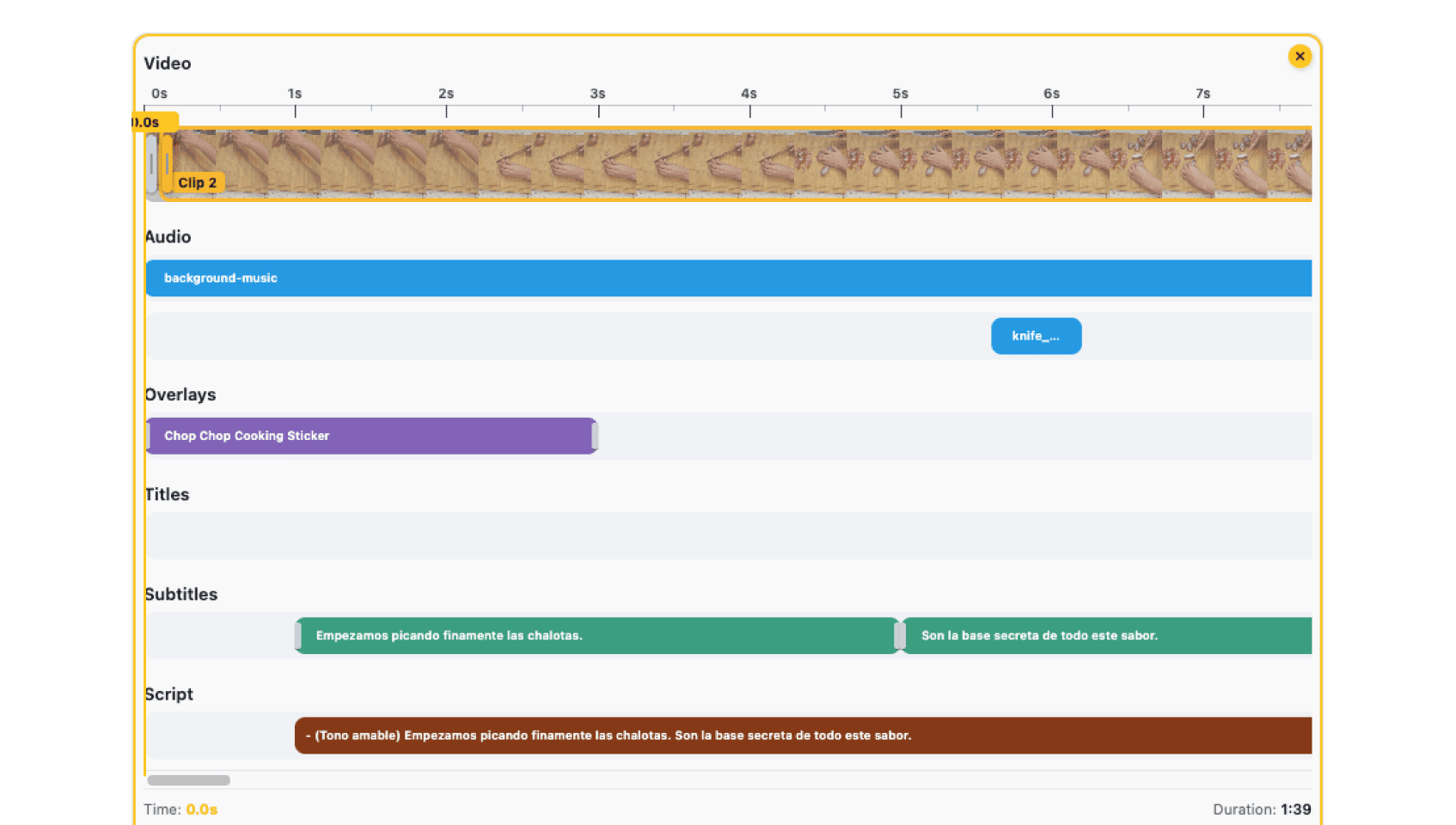
Effects appear as real elements in the timeline, so you can move them, trim them, delete them, or lock them precisely where you want them to land.
Audio enhancement and transformation
Beyond generating new audio, Rkive can also enhance and transform existing sound inside an edit.
Using AI, Rkive can apply advanced noise reduction, isolate voices in complex or crowded environments, adjust tonal balance, and reshape background sound such as ambience or texture (ASMR). You can clarify speech recorded in difficult conditions, emphasize or soften environmental audio, separate overlapping voices, or modify existing music and effects to better fit the cut.
These enhancements are applied in context. They respond to the structure of the edit, the role each sound plays, and the direction you give, rather than relying on fixed presets. Enhanced elements remain fully editable on the timeline.
Audio enhancement isn’t a cleanup step at the end. It’s part of shaping how the edit feels.
Voiceover that’s planned, not just recorded
Voiceover in Rkive is designed as part of the editing process.
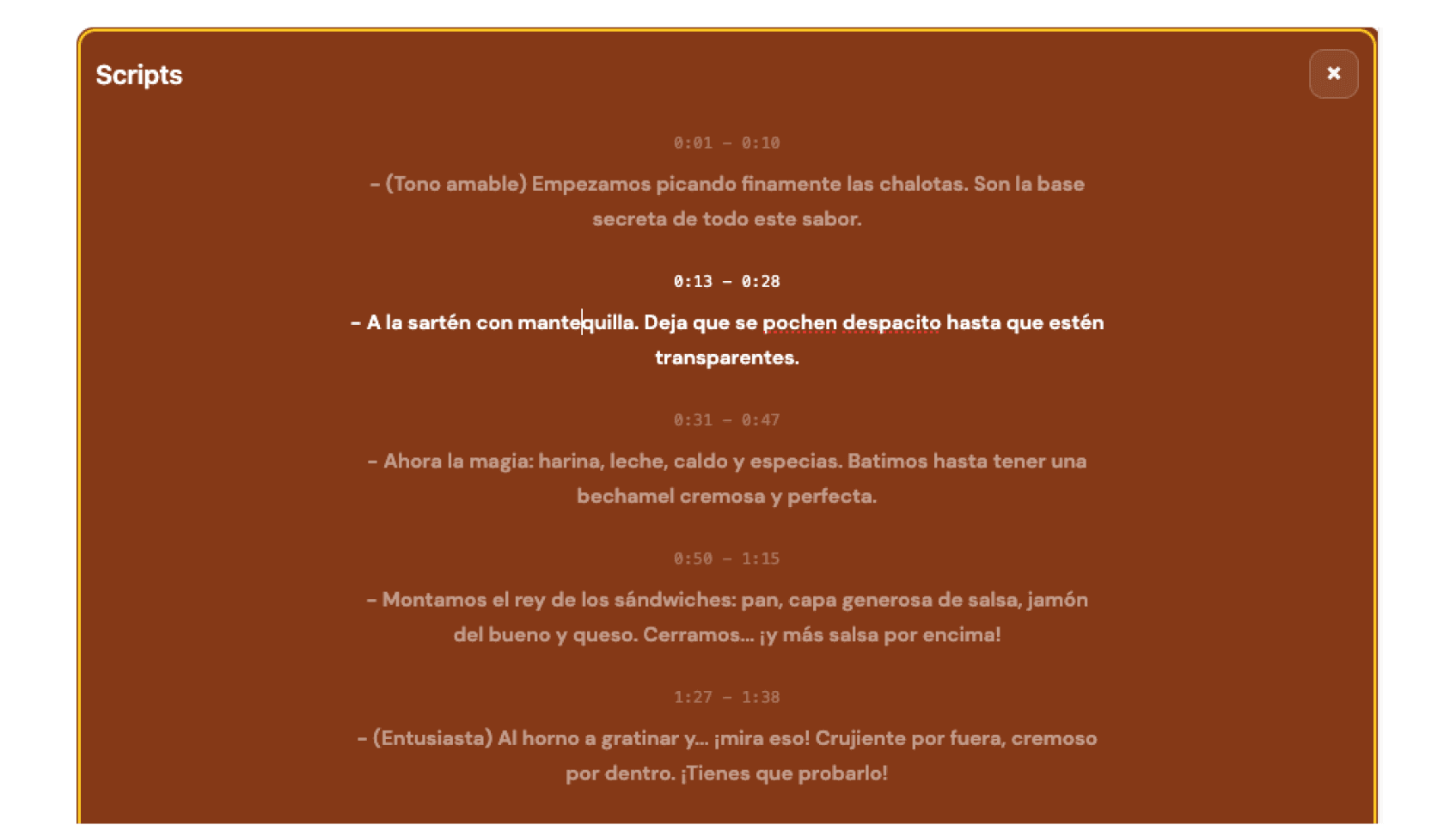
When narration is part of a post, Rkive can generate voiceover script segments aligned to specific moments in the timeline. These lines are shaped to land where they should, matched to the pacing and structure of the cut.
Scripts are refined in context, taking into account your previous work, typical phrasing, and strategy. You can rewrite individual lines, tighten sections, or explore alternatives without rewriting everything.
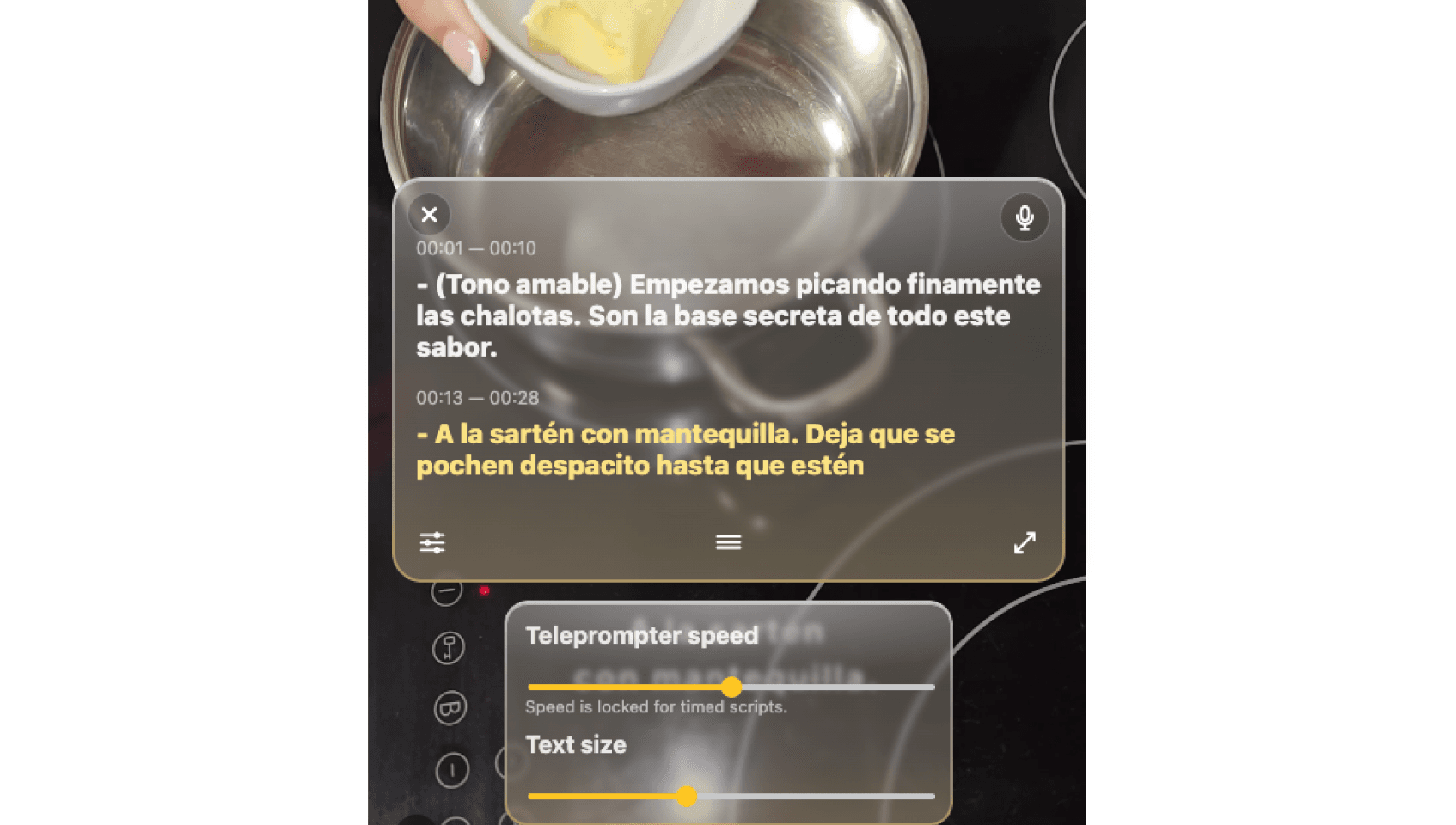
Recording happens directly inside the editor. The active line is visible while you record, the audio lands in the correct position on the timeline, and it becomes a first-class element alongside music and effects.
A real audio timeline, with real control
In the manual editor, audio is visible and structured.
Source audio from footage, background music, sound effects, voiceover recordings, and enhanced elements all appear as distinct items in the timeline. This makes it easy to understand how sound is layered and how it relates to the visuals.
You can rebalance and adjust at the element level. Pull music down only under speech. Shift an effect slightly later. Replace or re-record a single voiceover line without touching the rest of the edit.
The interface stays calm and readable. The system stays flexible.
Designed for iteration
Audio is one of the fastest ways to change how an edit feels.
Rkive is built to make that exploration easy. You can keep the same visual cut and try different audio directions, refining through prompts and finishing with manual adjustments when needed.
Iteration stays inside the same workspace, without forcing you to restart or duplicate work.
Why this exists
Sound is pacing, emphasis, and atmosphere. It’s often what gives an edit its character.
Treating audio as an afterthought breaks that connection.
“We wanted audio to be shaped with the cut, not layered on afterward. Music, effects, voiceover, and sound enhancement should live in the same editing space as every other creative decision.”
— Alberto Luengo, CEO & Founder
Available now
Audio editing is rolling out across Rkive.